What Is Invoice Processing?A Complete Guide for Businesses & Finance Teams
Every time a business buys goods or receives services, a paper trail begins. At the heart of that trail is an invoice — and how a company handles that invoice determines whether bills get paid on time, suppliers stay happy, and finances stay healthy. Invoice processing is the backbone of accounts payable operations, yet it is often one of the most overlooked processes in a business.
According to industry research, a typical company spends between $10 and $15 to manually process a single invoice. Multiply that by hundreds or thousands of invoices per month, and the cost adds up fast. Errors, delays, and fraud in invoice processing cost businesses billions of dollars each year globally.
Whether you are a business owner trying to streamline operations, a finance professional optimizing accounts payable, an accountant managing vendor payments, or a student learning about financial workflows — understanding what invoice processing is and how it works is essential knowledge.
This complete guide explains the invoice processing definition, the step-by-step invoice processing workflow, the difference between manual and automated invoice processing, common challenges, and best practices for efficient invoice management.
What Is Invoice Processing? (Definition)
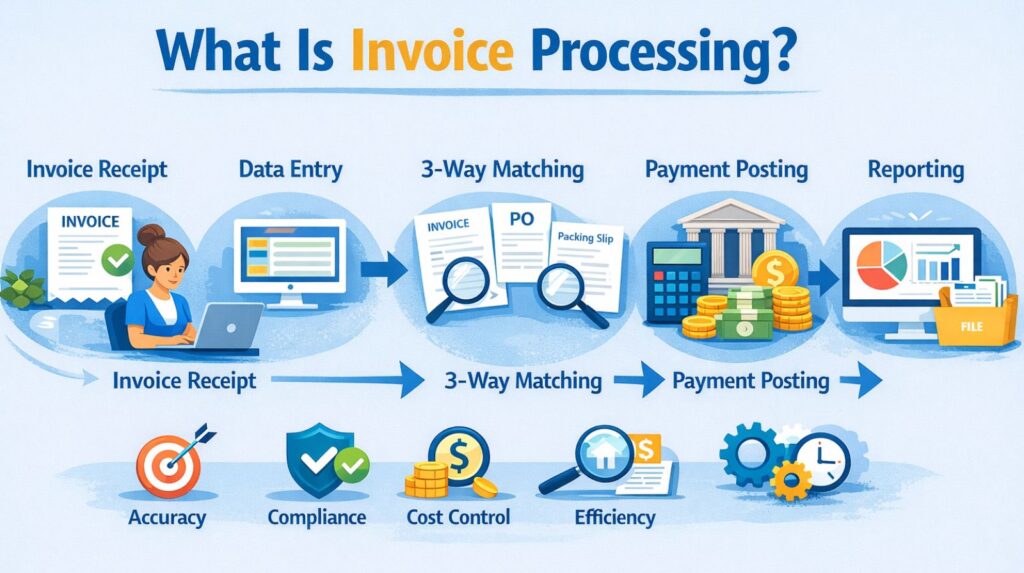
Invoice processing is the end-to-end workflow that a business follows to receive, verify, approve, and pay vendor invoices. It is a core function of the accounts payable (AP) department and ensures that every payment made by a company is accurate, authorized, and recorded in the financial system.
Quick Definition: Invoice Processing |
• Invoice processing is the complete set of steps a business takes to handle vendor invoices — from receipt and data extraction, through verification and approval, to payment and record keeping. |
• It is also known as the accounts payable invoice process or AP invoice workflow. |
• It applies to invoices received via email, postal mail, EDI (Electronic Data Interchange), or online portals. |
In simple terms: a supplier sends you a bill. Your team checks it, approves it, pays it, and files it. That entire process — from receiving the invoice to storing the payment record — is invoice processing.
Why Is Invoice Processing Important?
Efficient invoice processing is critical to the financial health and operational efficiency of any business. Here is why it matters:
- Cash Flow Management — Cash Flow Management — Processing invoices promptly helps businesses plan outgoing payments and maintain healthy cash flow.
- Vendor Relationships — Vendor Relationships — Timely payments keep suppliers satisfied and prevent supply chain disruptions.
- Cost Control — Cost Control — Accurate invoice verification prevents overpayments, duplicate payments, and fraudulent invoices.
- Regulatory Compliance — Regulatory Compliance — Properly recorded invoices support tax filing, audits, and financial reporting requirements.
- Business Intelligence — Business Intelligence — Invoice data provides insights into spending patterns, preferred vendors, and budget performance.
- Operational Efficiency — Operational Efficiency — Streamlined invoice workflows free up staff time for higher-value financial activities.
Poor invoice processing, on the other hand, leads to late payment penalties, strained vendor relationships, audit failures, and inaccurate financial statements.
Step-by-Step Invoice Processing Workflow
The accounts payable invoice process follows a structured sequence of steps. Here is a detailed breakdown of each stage in the invoice processing workflow:
Step 1: Invoice Receipt
The process begins when a vendor or supplier sends an invoice to the business. Invoices may arrive through multiple channels:
- Email (PDF attachment or inline invoice)
- Postal mail (physical paper invoices)
- Electronic Data Interchange (EDI)
- Vendor portals or procurement platforms
- Fax (less common but still used in some industries)
Best practice: Centralise all invoice receipt to a single email inbox or portal to avoid invoices being missed or duplicated.
Step 2: Data Extraction
Once received, key data must be extracted from the invoice. This includes:
- Invoice number and invoice date
- Vendor name, address, and contact details
- Line-item descriptions, quantities, and unit prices
- Total amount due and applicable taxes
- Payment terms and due date
- Purchase Order (PO) number (if applicable)
In manual processing, a staff member enters this data into the accounting system by hand. In automated invoice processing, Optical Character Recognition (OCR) technology extracts the data automatically.
Step 3: Invoice Verification
Before any payment is approved, the invoice must be verified for accuracy. Verification checks include:
- Is the invoice addressed to the correct company?
- Are the goods or services described what was actually ordered?
- Do the prices, quantities, and totals match what was agreed?
- Is this a duplicate invoice?
- Are all required fields complete and legible?
Any discrepancies found during verification must be flagged and resolved with the vendor before the process can continue.
Step 4: Purchase Order (PO) Matching
For businesses that use purchase orders, this step involves matching the invoice to the corresponding PO and goods receipt. This is commonly called the 3-way matching process:
Match Type | Documents Compared | Purpose |
2-Way Match | Invoice vs. Purchase Order | Confirms quantities and prices match the original order |
3-Way Match | Invoice vs. PO vs. Goods Receipt | Also confirms goods were actually received |
4-Way Match | Invoice vs. PO vs. Receipt vs. Inspection Report | Adds quality inspection confirmation |
PO matching is a powerful control mechanism that prevents paying for goods never received or prices never agreed upon.
Step 5: Approval Routing
Once verified, the invoice is routed to the appropriate person or team for approval. Approval workflows typically depend on:
- Invoice value — higher amounts require more senior approval
- Department — invoices go to the relevant cost centre manager
- Vendor type — strategic vendors may have expedited approval
- Policy rules — company-specific delegation of authority
In a manual system, this involves physically routing the invoice or sending emails. In an automated invoice management system, approval notifications are sent automatically and approvers can action them digitally.
Step 6: Payment Execution
After approval, payment is scheduled and executed according to the agreed payment terms. Payment methods include:
- Bank transfer (ACH / BACS / SWIFT)
- Cheque or check
- Credit card
- Payment platforms (PayPal, Stripe, etc.)
Early payment discounts (e.g., 2/10 Net 30 — 2% discount if paid within 10 days) should be factored into payment scheduling to reduce costs.
Step 7: Record Keeping and Archiving
The final step is recording the payment in the accounting system and archiving the invoice. Proper record keeping ensures:
- Accurate financial statements and trial balances
- Audit trail for internal and external audits
- Tax compliance and VAT/GST reclaim ability
- Vendor payment history for dispute resolution
Most businesses are required by law to retain invoice records for 5–7 years, depending on jurisdiction.
Manual vs. Automated Invoice Processing
One of the most important decisions a growing business faces is whether to continue processing invoices manually or invest in an automated invoice management system. Here is a side-by-side comparison:
Factor | Manual Invoice Processing | Automated Invoice Processing |
Speed | Days to weeks per invoice cycle | Hours to minutes per invoice cycle |
Cost per Invoice | $10–$15 per invoice | $2–$4 per invoice |
Error Rate | High (human data entry errors) | Very low (automated extraction) |
Scalability | Limited — requires more staff as volume grows | Highly scalable with no added headcount |
Visibility | Low — difficult to track invoice status | Real-time dashboards and status tracking |
Fraud Detection | Reactive — errors often found after payment | Proactive — flags anomalies before payment |
Audit Trail | Paper-based, hard to retrieve | Digital, searchable, timestamped |
Early Payment Discounts | Often missed due to processing delays | Captured consistently with automated scheduling |
Compliance | Manual record management, risk of gaps | Automatic archiving and compliance reporting |
Integration | Requires manual entry into accounting systems | Integrates directly with ERP/accounting software |
Benefits of Automated Invoice Processing
Automated invoice processing — powered by AI, OCR, and workflow automation — delivers measurable benefits to businesses of all sizes:
1. Significant Cost Savings
Automation reduces the cost of processing each invoice from $10–$15 down to $2–$4. For a business processing 500 invoices per month, that represents annual savings of $48,000–$78,000.
2. Faster Processing Times
Automated invoice workflows can process invoices in hours rather than days, allowing businesses to meet payment deadlines consistently and capture early payment discounts.
3. Reduced Errors and Duplicate Payments
OCR technology and automated PO matching eliminate manual data entry errors. Duplicate invoice detection algorithms prevent paying the same invoice twice — a surprisingly common and costly mistake.
4. Real-Time Visibility
Invoice management systems provide real-time dashboards showing every invoice’s status — received, in review, approved, paid. Finance teams can answer vendor queries instantly without hunting through paper files.
5. Stronger Vendor Relationships
Consistent, on-time payments build trust with suppliers. Some automated systems also offer vendor portals where suppliers can submit invoices and track payment status themselves.
6. Improved Compliance and Audit Readiness
Digital audit trails, automated retention policies, and built-in approval controls make regulatory compliance significantly easier. Audits that previously took weeks of document retrieval can be completed in hours.
Common Invoice Processing Challenges and Solutions
Challenge | Impact | Solution |
Invoice arrives in multiple formats (email, paper, PDF) | Inconsistent data entry and processing delays | Centralise receipt; use OCR to handle all formats |
Missing or incorrect PO numbers | Cannot complete 3-way matching; approval stalled | Enforce PO requirement before invoice submission |
Duplicate invoices | Double payments eroding profit margins | Automated duplicate detection in AP software |
Invoice fraud and phishing | Financial losses and reputational damage | Verified vendor lists, anomaly detection, segregation of duties |
Slow approval processes | Late payments, missed discounts, strained vendor relations | Automated approval routing with mobile access for approvers |
Lack of visibility into AP status | Inability to forecast cash outflows accurately | Real-time dashboards and AP reporting tools |
Manual data entry errors | Incorrect payments and time-consuming corrections | OCR and AI-powered data extraction; validation rules |
Best Practices for Efficient Invoice Processing
Whether you are managing invoices manually or with an automated system, these best practices will improve accuracy, speed, and compliance in your accounts payable invoice process:
- Standardise Your Invoice Requirements — Tell vendors exactly what information must appear on every invoice (PO number, company name, line items). Reject non-compliant invoices immediately.
- Centralise Invoice Receipt — Use a single email inbox (e.g., ap@yourcompany.com) or vendor portal so no invoice is ever lost or duplicated.
- Implement a Formal Approval Hierarchy — Define who approves invoices at each value threshold and document it in a Delegation of Authority (DOA) policy.
- Perform Regular Vendor Statement Reconciliation — Compare your AP records against vendor statements monthly to catch any missing or disputed invoices early.
- Prioritise Invoices with Early Payment Discounts — Flag discount-eligible invoices for fast-track processing to maximise savings.
- Maintain a Vendor Master File — Keep accurate, up-to-date records of vendor bank details, payment terms, and contact information to prevent fraud and payment errors.
- Conduct Periodic AP Audits — Regularly review your invoice processing workflow to identify bottlenecks, errors, and improvement opportunities.
- Train Your Team on Fraud Awareness — Educate AP staff to recognise common invoice fraud schemes such as fake vendor invoices, CEO fraud, and altered bank details.
- Use KPIs to Monitor Performance — Track metrics like invoice processing time, cost per invoice, error rate, and on-time payment rate.
- Integrate Your Invoice System with Your Accounting Software — Ensure data flows seamlessly between your invoice management system and your ERP or accounting platform.
The Future of Invoice Processing
Invoice processing is evolving rapidly. Emerging technologies are transforming what was once an entirely manual, paper-based process into a smart, self-managing financial function.
Artificial Intelligence (AI) and Machine Learning
AI-powered invoice processing systems can learn from historical data to automatically categorise invoices, predict approval pathways, detect anomalies that may indicate fraud, and even flag vendors who historically submit incorrect invoices. Machine learning models improve over time, continuously increasing accuracy without manual intervention.
Optical Character Recognition (OCR) and Intelligent Document Processing
Modern OCR technology has moved far beyond simple text scanning. Intelligent Document Processing (IDP) systems combine OCR with natural language processing to understand invoice context — correctly interpreting invoices in multiple languages, currencies, and formats, including handwritten invoices and non-standard layouts.
Robotic Process Automation (RPA)
RPA bots can handle high-volume, repetitive invoice tasks — logging into vendor portals, downloading invoices, entering data into ERP systems, and triggering approval workflows — without human involvement and without errors.
Blockchain for Invoice Verification
Blockchain technology is being explored to create tamper-proof invoice records. A blockchain-based invoice would be cryptographically verified, eliminating the possibility of invoice fraud and providing an immutable audit trail.
E-Invoicing and Government Mandates
Many countries are moving toward mandatory e-invoicing — electronic invoices submitted directly to a government tax authority for real-time validation before payment. Businesses operating internationally need to prepare for these regulatory requirements, which are already in effect in countries like Italy, India, and Brazil.
Real-Time Payments Integration
As real-time payment rails (such as Faster Payments in the UK and RTP in the US) become mainstream, invoice processing workflows are evolving to schedule and execute payments instantly upon approval — further compressing payment cycles and improving cash flow predictability.